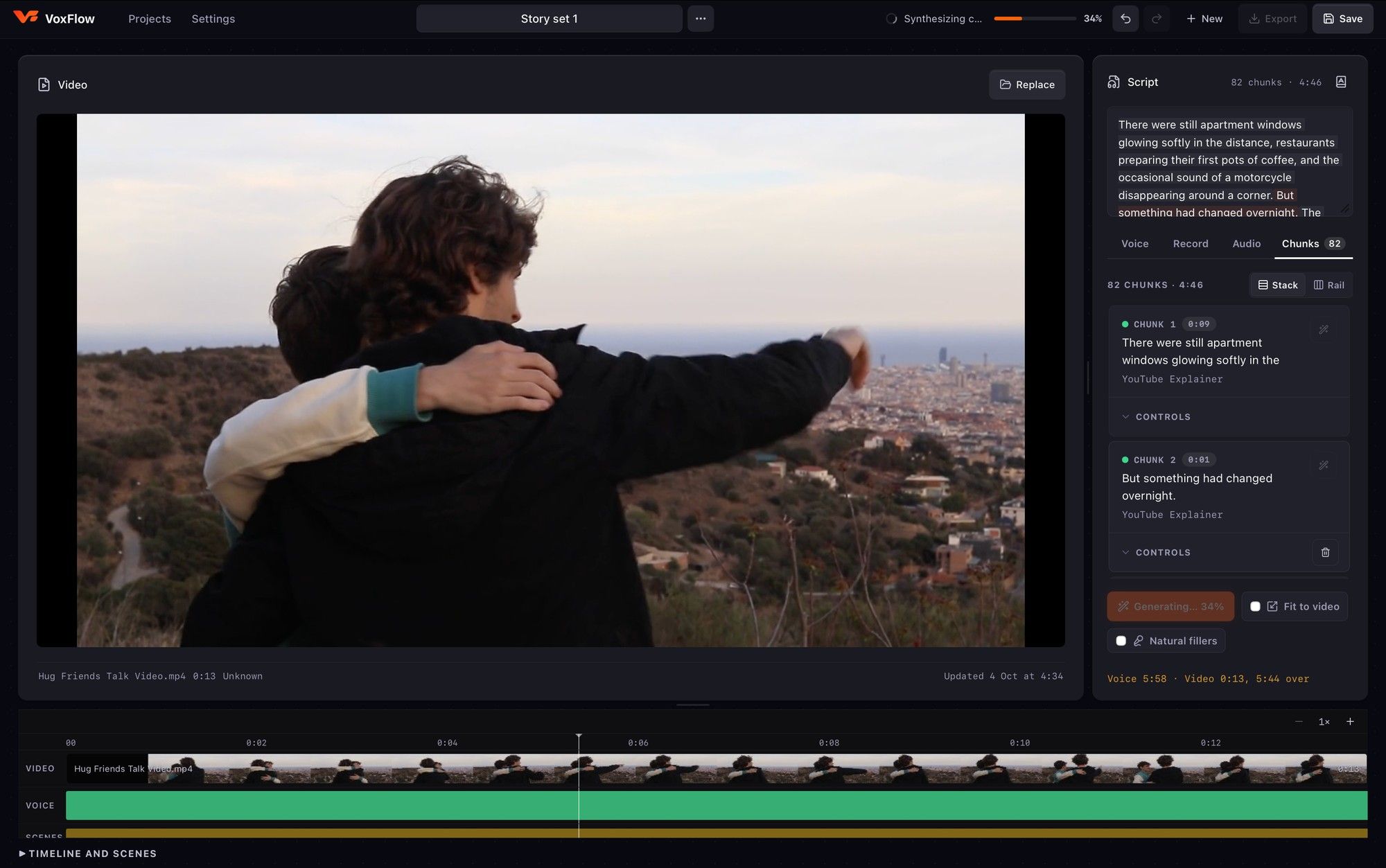
VoxFlow turns a script into a voiceover for your video, entirely on your Mac. Pick a voice from one of several local engines (Piper, Kokoro, or Qwen for performed emotion), generate it chunk by chunk on a timeline under the video, then export the finished cut.
No account, no cloud, no per-character billing: your script never leaves your machine.
Built with
- Tauri
- React
- TypeScript
- Piper
- Kokoro
- Qwen TTS
- Whisper
- FFmpeg
- OpenAI Codex
01Voices
- Multiple local voice engines: Piper, Kokoro and Qwen, with more to come
- Qwen takes a written direction and performs the emotion
- Delivery styles (Explainer, Documentary, Podcast, Audiobook…) you can edit or create
- Real controls for rate, pitch, warmth, punch, volume and pauses
02Script to timeline
- Type a script, or record a take and let on-device Whisper transcribe it
- Generate per chunk for an editable timeline, or the whole script as one take
- Video, voice and scene tracks under the player
- Fit to video, with a live read of how long the voice runs against the clip
03Made for the Mac
- Native desktop app built with Tauri + React
- Runs offline: models live on your machine
- Sound effects from Freesound's Creative Commons library
- Export the finished video with FFmpeg